B2B Quick Order List
Enable high-efficiency wholesale buying. The B2B Quick Order List displays a tabular grid of all product variants, allowing bulk buyers to configure quantities and add everything to their cart in a single batch request.
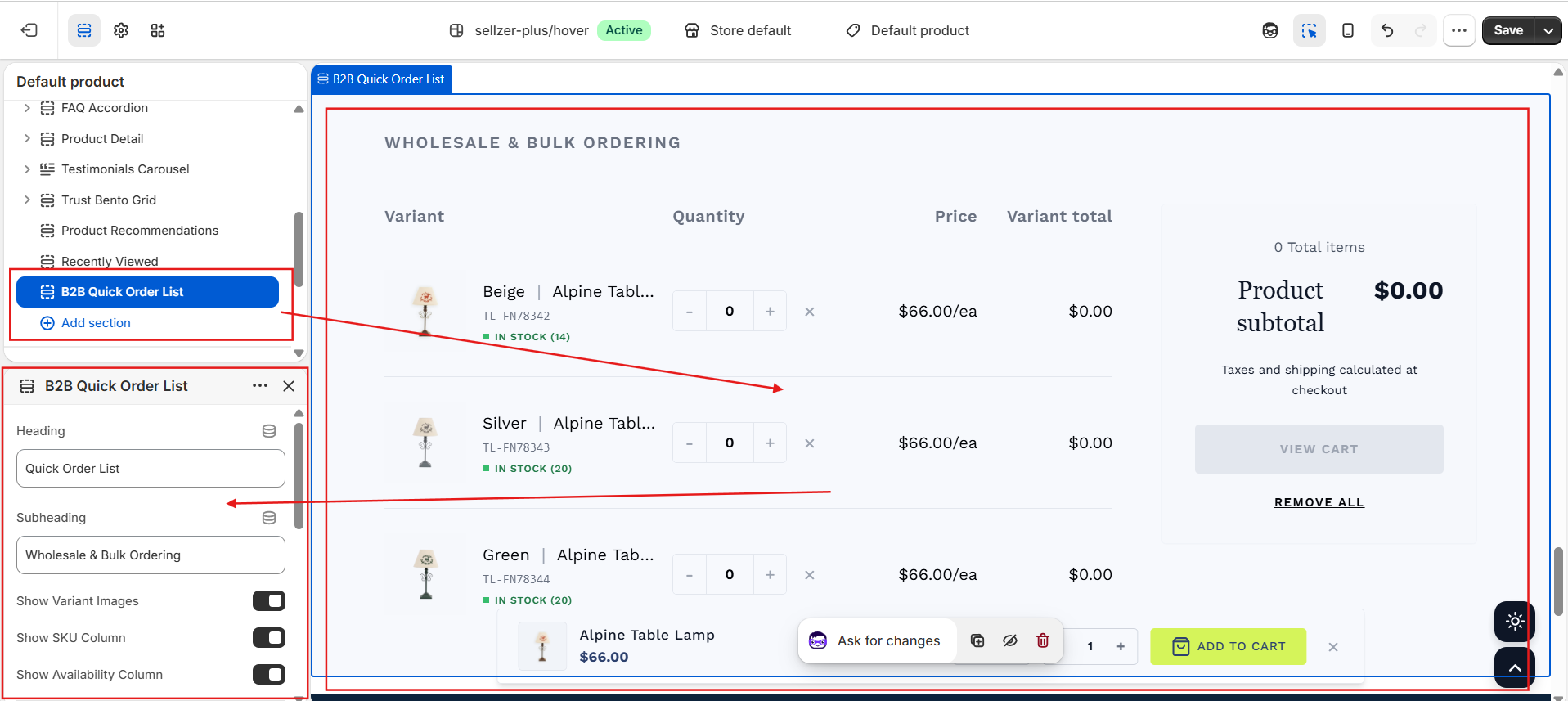
Overview
Wholesale and B2B buyers have different needs compared to standard retail customers. Instead of visiting multiple variant pages and buying items one-by-one, bulk buyers require a direct, spreadsheet-like interface. Sellzar's B2B Quick Order List handles this natively, converting the standard product page into a high-speed catalog listing.
Grid Layout Columns
Displays the variant title, product title, image, SKU number (optional), and real-time inventory counts (optional, e.g., "In Stock (12)" or "Sold Out").
Provides precise plus (+) and minus (-) increment buttons with numeric input fields. Includes a reset (×) button to quickly zero out a variant's count.
Calculates and updates variant prices and individual variant totals on the fly as quantities change. Shows compare-at prices to highlight wholesale discount tiers.
Order Summary Panel
Stuck to the side of the screen on desktop viewports, this summary panel provides instant checkout feedback:
- Total Items: The total quantity of items configured across all variants.
- Product Subtotal: Real-time sum total calculation of all added variants.
- Batch Checkout Button: Posts all variants with quantity > 0 to the Shopify cart in one AJAX request, and immediately redirects the user to the cart page.
- Remove All: Clear all configured variant quantities with a single click.
Section Configuration Settings
You can customize columns and spacing in the Shopify Theme Editor:
templates: ["product"], allowing you to add it directly to standard or alternate product templates./cart/add.js endpoint containing the full array of selected variant IDs and their respective quantities, avoiding multiple loading cycles and rate limit errors.