Gift Wrapping
Provide premium checkout services. Sellzar’s native Gift Wrapping feature inserts upsell checkouts directly into the cart flow, allowing merchants to capture surcharge add-ons and custom greeting messages.
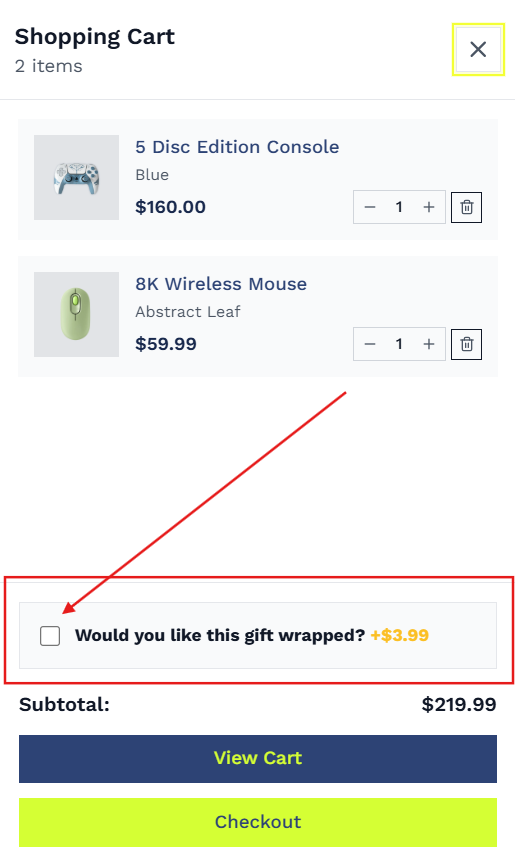
Overview
Offering gift wrapping is a proven method to raise transaction values and support holiday shopping periods. Unlike standard approaches that require complex apps, Sellzar features a lightweight, native snippet (gift-wrapping.liquid) integrated directly into the Cart Drawer and Cart Page.
How It Works
Toggling the checkbox calls Shopify's AJAX /cart/add.js or /cart/change.jsendpoints to add or clear the wrapping product, instantly refreshing line items.
Checking the box reveals a text area. User input is automatically synced to Shopify Cart Attributes (as attributes['Gift Message']) so it displays on admin orders.
If the widget is loaded in both the Cart Drawer and the Cart Page, checkbox states and textarea inputs remain perfectly in sync using event listeners.
Merchant Setup Guide
To configure native gift wrapping:
- In Shopify Admin, create a new product named Gift Wrapping (e.g., set pricing to $5.00, disable shipping if virtual, and ensure inventory tracking is turned off or has stock). Note the product handle.
- Go to the Theme Customizer and open your Theme Settings panel.
- Select General Settings.
- Toggle the checkbox to Enable Gift Wrapping.
- Under Gift Wrapping Product, search and select the product you created in Step 1.
- Customize the label text (e.g. "Wrap it as a gift?") under Gift Wrapping Label.