Contact Systems
Provide your customers with polished, high-performance customer service portals. Sellzar includes three customizable contact layouts: the Standard Contact Page, the Advanced Split-Form Banner, and the Contact Details Grid.
1. Standard Contact Page
The Standard Contact Page section (`sections/contact.liquid`) is designed as a full-width layout, ideal for dedicated "Contact Us" pages. It pairs your brand details (email, phone, address, and website links) directly with an interactive contact form and Google Maps panel.
Core Form Fields
Accepts input from customers which is piped directly to your Shopify Customer Admin portal:
- Name: Required text input for customer identification.
- Email: Required email validation input field.
- Message: Textarea box for general support requests or inquiries.
Design & Spacing
Easily style the layout block to match your storefront guidelines:
- Container Radius: Automatically inherits the global `main-body-radius` CSS token.
- Margins & Padding: Sliders to set padding (top/bottom) and margins to balance layout spacing.
- Background Options: Select custom background colors and control opacity (0% to 100%).
2. Advanced Split Contact Form
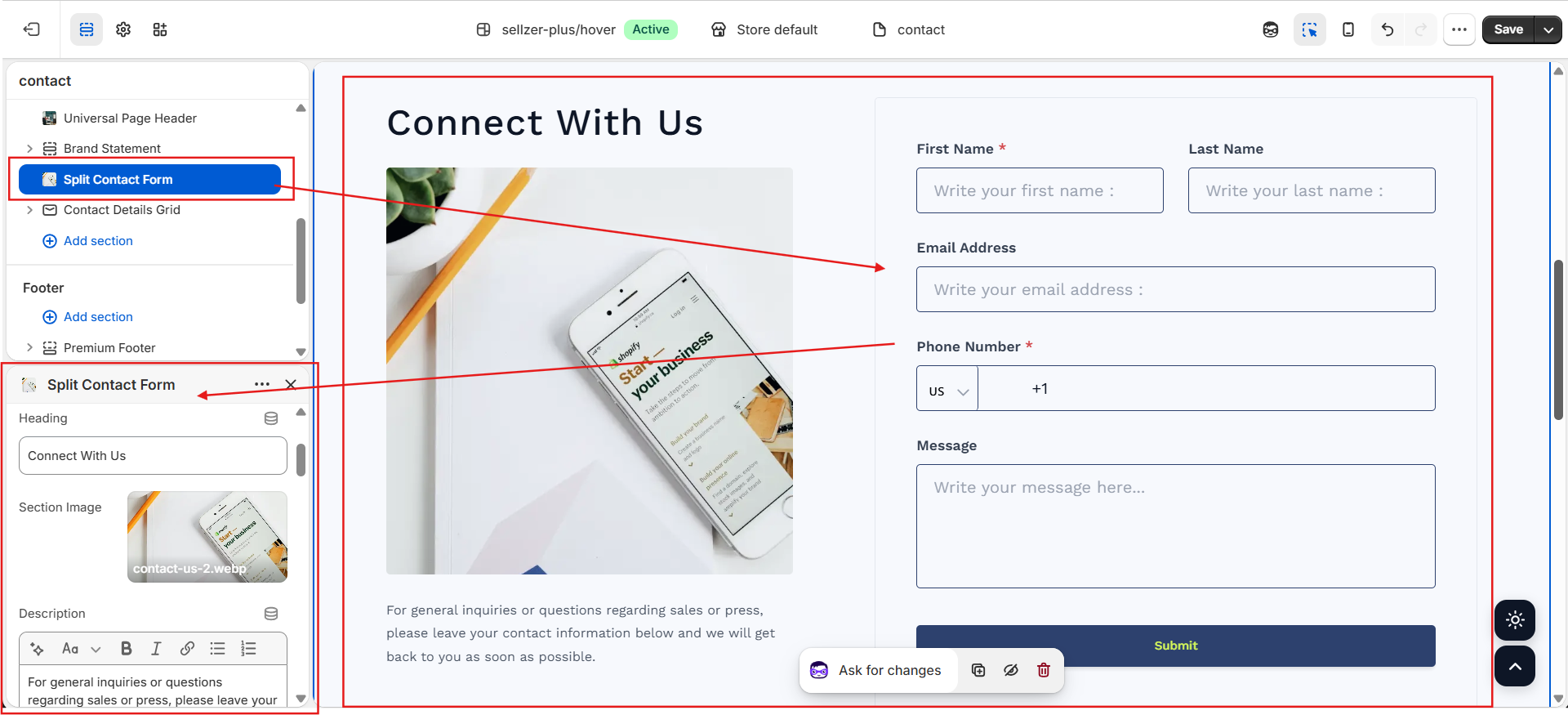
The Split Contact Form (`sections/contact-split-form.liquid`) is a premium section that balances brand storytelling imagery with a structured multi-field support application form.
Featured Merchant Capabilities
Includes an advanced international country selection dropdown complete with search filtering, emoji flags (e.g. 🇺🇸), and auto-populated country codes. It formats telephone dial patterns automatically based on the merchant settings.
Upload an engaging lifestyle image alongside the form. Choose whether the image displays on theLeft or Right side of the screen on desktop screens.
Merchants can customize both label titles and placeholders for First Name, Last Name, Email, Phone, and Message boxes directly in the Theme Editor—ideal for translating terms or matching brand tone.
Modify the main submit button background and hover colors, control outline border thickness, toggle outer card boundaries, and customize input box outlines.
Google Maps Integration Guide
Showcase physical boutique stores, headquarter buildings, or fulfillment warehouses using two flexible mapping mechanisms:
Google Maps API Resolution
Enter a location query (e.g. New York, NY or 1600 Amphitheatre Pkwy, Mountain View, CA) into the **Map Address** field. The section will dynamically compile a Google Maps lookup and generate a responsive, touch-friendly iframe container automatically.
Raw Iframe Embed Code
To style your maps or display custom map markers: navigate to Google Maps, select **Share**, click **Embed a map**, copy the HTML code, and paste it directly into the **Map Embed (HTML)** field. The theme will override the standard map and scale your custom iframe container to fit.
3. Contact Details Grid
The Contact Details Grid (`sections/contact-details-grid.liquid`) builds an asymmetrical, 4-column card catalog to organize contact channels, warehouse destinations, or social networks.
Contact Card Block
Renders phone support lines or direct email channels. Allows picking custom Lucide icons and displays standard click-to-dial or click-to-email active link triggers.
Address Card Block
Renders physical coordinates and address titles with customizable map marker symbols.
Custom Social Link Block
Allows adding individual social profiles (e.g. Pinterest, Twitter) with customized link targets opening in new window tags.
Global Social Grid Block
Automatically draws active profile configurations saved under your global **Theme Settings > Social Media** dashboard and styles them in a unified horizontal array.
Merchant Tip: Dynamic Column Reordering
Each block within the **Contact Details Grid** features a **Column Position** slider (ranging from 1 to 4). This setting allows you to rearrange the desktop card order dynamically from within the Theme Editor without needing to delete, recreate, or re-populate block content. (For example, to move Column 4 to the first visual slot, simply change its slider value to `1`).
All contact forms in Sellzar integrate natively with Shopify's background recaptcha engines to protect your support inbox from spam bots while maintaining a seamless user experience.